Insurance software platforms have become very good at saying they integrate. I have sat through enough demos to know the rhythm. A vendor shows a clean diagram, a few arrows move between systems, someone says API-first, and half the room nods as if we have just solved underwriting, claims, finance, compliance, and possibly world peace.
Here is my hot take after 10 years around carriers, MGAs, brokers, and claims teams: integration is no longer impressive. Integration is the admission ticket. If a platform can connect to your policy admin system, claims system, document store, email inbox, and data providers, wonderful. So can plenty of others.
The real question is what happens after the connection is made.
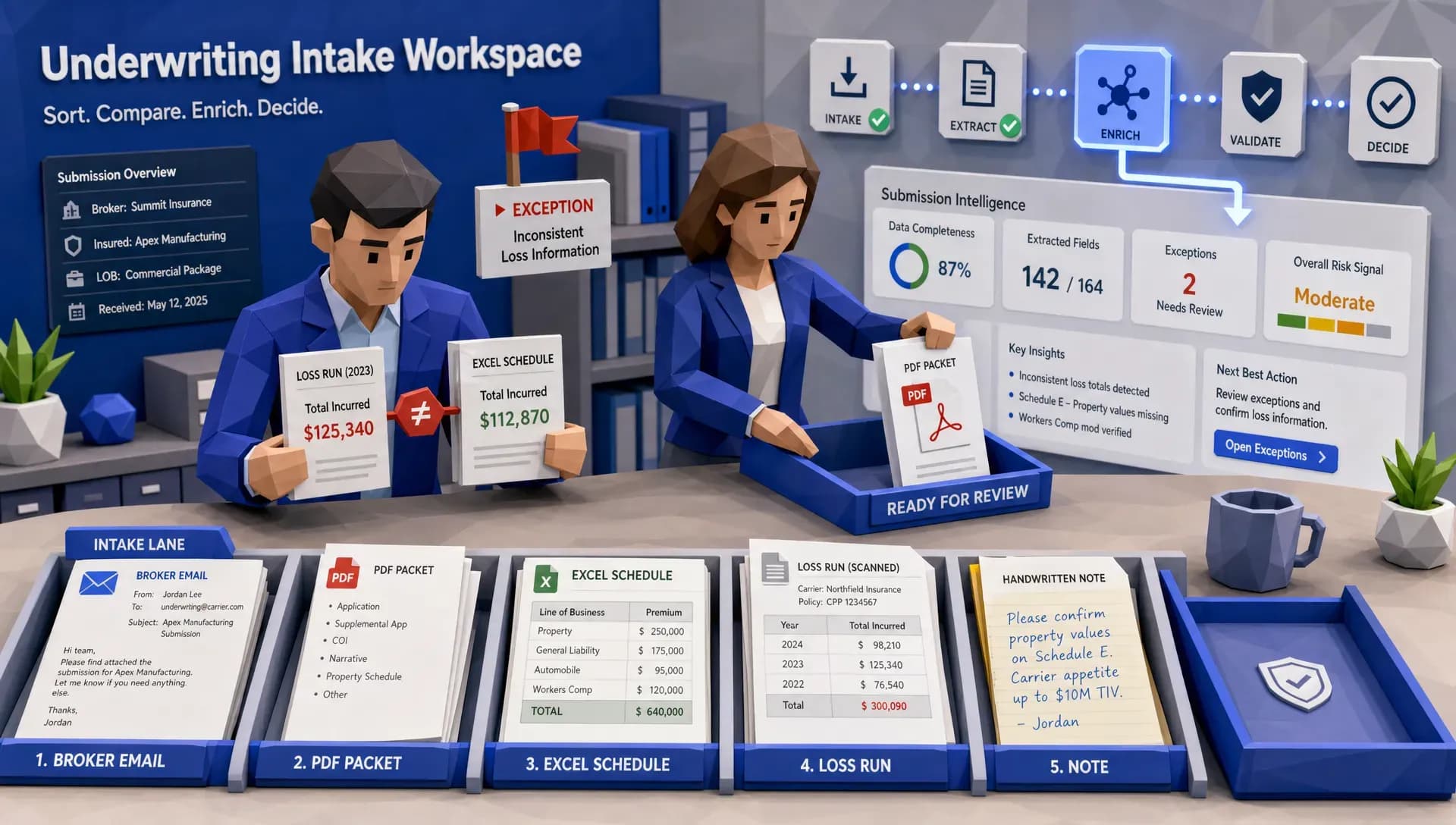
I once watched an underwriter at a fast-growing MGA receive a submission, open three PDFs, check two third-party portals, update a spreadsheet, copy data into the policy system, then send a follow-up email asking for the same missing information the broker had already provided on page 17 of an attachment. The company had integrations. What it did not have was work moving cleanly from intake to decision.
That distinction matters. McKinsey has estimated that underwriters can spend as much as 60% of their time on administrative tasks, rather than actual risk assessment. In plain English, that means highly paid risk professionals are still doing digital paperwork with better lighting.
Integration solves access. It does not solve work.
A basic integration lets one system talk to another. That is useful. We need it. Nobody wants another stranded data island sitting in the corner like an abandoned filing cabinet.
But insurance work is not simply a matter of moving fields from System A to System B. A submission might include inconsistent names, missing values, scanned loss runs, broker notes, schedules of vehicles, property details, prior carrier documents, and a few surprises that only appear when the deal is already urgent. Claims are even messier. Attorney demands, photos, police reports, repair estimates, medical bills, handwritten notes, and emails arrive in formats that were clearly not designed by people who enjoy clean databases.
An integration can pass a document along. A proper insurance software platform should understand the work that document creates.
That is where many platforms fall short. They proudly connect to everything, then leave your people to interpret, validate, chase, enrich, decide, and report manually. It is a bit like hiring a courier who can deliver ingredients to your kitchen but cannot cook. Helpful, yes. Dinner, no.
The hidden cost of connected but passive systems
Passive integrations create a dangerous illusion. Leadership sees data flowing, so they assume the operation is modernizing. Meanwhile, the frontline team still lives in email, spreadsheets, notes, and exception queues.
You see the cost in quote abandonment, because submissions sit too long before anyone knows what is missing. You see it in claims leakage, because triage happens late or inconsistently. You see it in fraud review, because suspicious signals are spread across too many places for any one adjuster to catch quickly. You see it in reporting, because the board wants a clean answer by Friday and the data team quietly starts building yet another manual extract.
Fraud is a good example. The FBI has cited insurance fraud as costing the United States more than $300 billion annually. Verisk’s 2025 fraud research also points to the growing concern carriers have around digitally enabled fraud, including manipulated images and synthetic documentation. If fraud signals are connected but not operationalized, your platform may technically have the data while the bad claim still walks out the door wearing a fake mustache.
Claims speed tells a similar story. J.D. Power reported that auto claim cycle times remain a major customer satisfaction issue, with repair and settlement processes often taking weeks, and the industry continues to push for faster resolution through better automation and process design. Customers do not care that your systems are integrated. They care whether their car is fixed, their claim is clear, and they are not being asked for the same document three times.
What should happen after an integration fires?
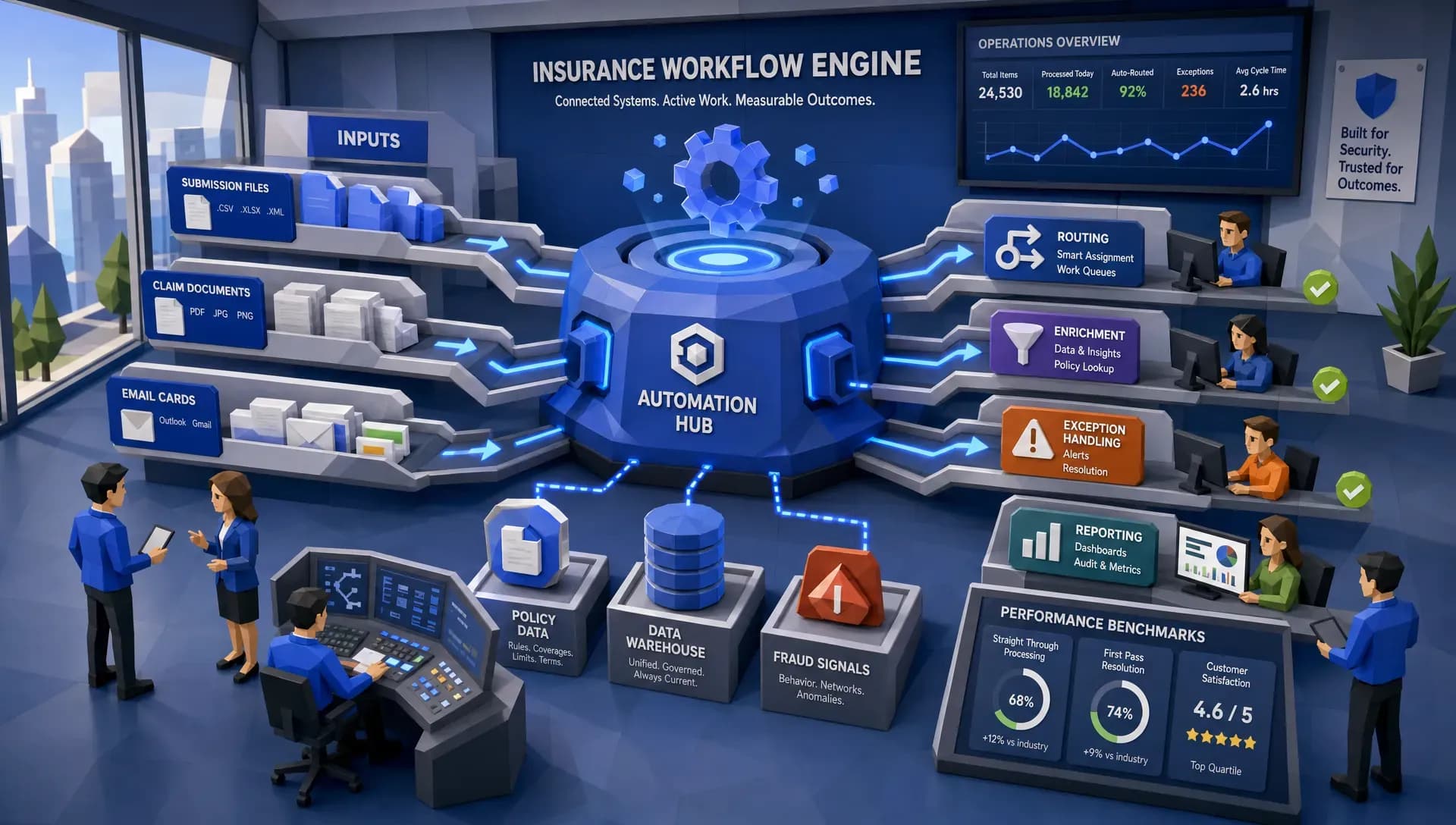
A serious platform should turn integrations into actions. That means data is captured, checked, enriched, routed, measured, and improved over time. The platform should not merely connect to the business. It should help run the repeatable parts of the business.
Scenario | Basic integration | Platform that actually helps
New submission arrives | Sends files into a queue | Extracts key data, flags missing items, enriches risk details, and routes the case
Underwriter needs third-party data | Provides a link or API call | Pulls relevant data into the workflow and records what changed the decision
Claim is opened | Creates a claim record | Classifies severity, identifies next steps, checks fraud indicators, and escalates exceptions
Attorney demand is received | Stores the demand letter | Reads the file, captures deadlines and demand details, and triggers the right response workflow
Management asks for performance reporting | Exports data to a spreadsheet | Feeds live dashboards with operational and portfolio-level insight
If you are evaluating vendors, this is where the conversation should get specific. Ask what happens to a messy file. Ask how the platform handles incomplete data. Ask how exceptions are assigned. Ask whether the automation produces usable analytics or just prettier task lists. Our guide on [what to look for in a digital insurance platform](https://www.inaza.com/blog/what-to-look-for-in-a-digital-insurance-platform) goes deeper on those buying questions, especially for teams dealing with legacy systems and specialized products.
Where automation should stop
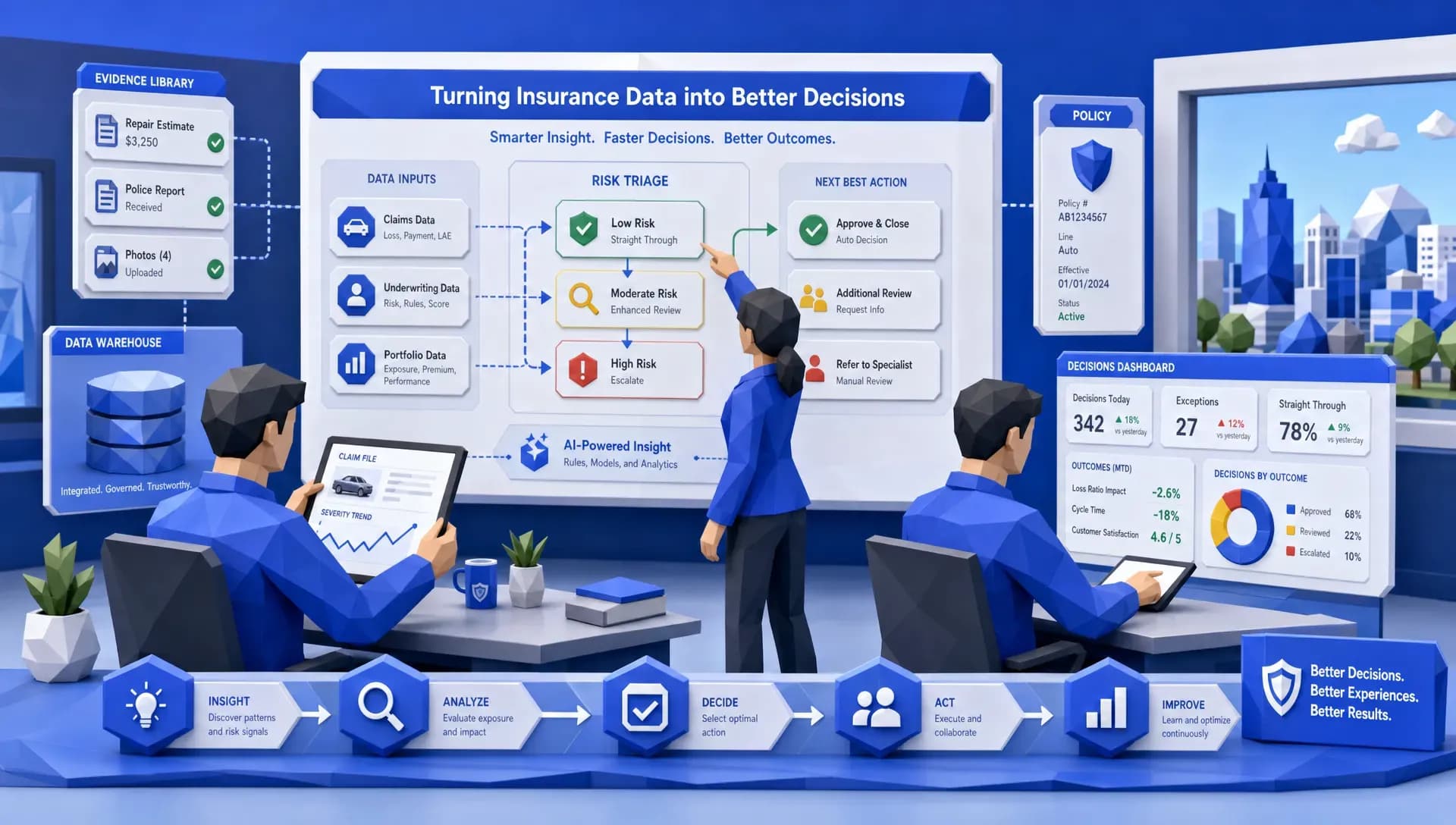
Straight-through processing sounds wonderful until you ask: straight through to where? A low-severity windshield claim with clean coverage and no suspicious signals may deserve a near-touchless path. A bodily injury claim with conflicting facts does not. A represented claimant with a demand package needs a different control structure entirely. A CAT claim needs fast triage and careful severity detection at the same time.
Celent has estimated that only 10% to 15% of claims are processed straight through without human intervention, which matches what I see in the field. The goal was never a touchless book. It is to stop spending skilled adjuster time on tasks that do not require skill.
So a serious platform conversation sorts the work into lanes before it discusses features:
- Simple, low severity, clean documentation: automate intake, validation, routing, communication and the payment recommendation. People review exceptions and monitor quality.
- Missing documents or incomplete facts: automate the follow-up request and the diary. A person decides whether the file can proceed.
- Potential fraud indicators: automate signal detection and referral packaging. A person investigates, documents and decides.
- Attorney-represented demand: automate extraction, chronology and reserve support. A person owns liability, damages and negotiation posture.
- Complex coverage or high severity: automate the data gathering and the summary. A person owns strategy and settlement.
If a vendor cannot explain where automation should stop, that is a red flag. I do not want software that tries to be brave. I want software that knows when to raise its hand.
It is also worth separating two things vendors tend to blur. Workflow automation says: move this claim to the next step. File intelligence says: here is what we know, here is what we do not know, here is what changed, and here is why the next step makes sense. Only the second improves the underlying file, and a messy file with faster routing is still a messy file. It just arrives sooner and annoys more people on the way.
One of my pet peeves is the phrase single source of truth. It sounds grand. It also gets abused.
A static database can be a single source of truth and still be nearly useless during the workday. If the truth arrives three days late, requires a data analyst to interpret, and does not tell anyone what to do next, the operation still has a problem.
What insurers need is operational memory. The platform should remember what came in, what was extracted, what was enriched, what rules were applied, what exceptions occurred, who touched the file, how long each step took, and what the outcome was. That is how you move from anecdotal management to evidence-based operations.
This is where a data warehouse underneath the workflow layer becomes powerful. Workflow automation handles the immediate job. The data warehouse captures the patterns. Over time, you can see where submissions stall, which brokers send cleaner business, which claims require repeat intervention, where fraud referrals spike, and which underwriting rules create the most manual review.
We have written separately about why insurance software systems should do more than store data, and the same principle applies here. Storage is passive. Integration is partial. The value comes when data becomes part of the workflow and the workflow becomes part of the intelligence layer.
Your team should not become the integration layer
There is another uncomfortable truth: when platforms integrate poorly, humans become the middleware.
I have seen this play out in very ordinary ways. A claims adjuster downloads a PDF from one portal, renames it, uploads it somewhere else, copies the claim number into a spreadsheet, and then emails a supervisor to confirm the escalation. Nobody would describe that as system integration, but functionally that person is connecting systems by hand.
This is expensive, slow, and frankly a little insulting to skilled insurance professionals. Underwriters should be judging risk. Adjusters should be resolving claims. Fraud analysts should be investigating suspicious patterns. Brokers should be advising clients. None of them signed up to be part-time data entry clerks with insurance licenses.
Good insurance software platforms respect the systems already in place while reducing the manual glue work between them. They should support existing environments, handle multiple file types, and allow teams to launch practical workflows without months of retraining. Pre-built workflow templates help here, but only if they can be adapted to the way the insurer, MGA, or broker actually operates.
This is also why pre-built API templates matter. If a team regularly uses sources like Verisk, LexisNexis, HazardHub, or other data providers, the platform should make enrichment feel routine rather than ceremonial. The goal is not to admire the integration. The goal is to help the user make a better decision faster.
Living with the legacy estate
I have yet to meet an insurer with a clean technology environment. Somewhere there is a core system that has been customised since the Clinton administration, a reporting database nobody wants to touch, and a spreadsheet called FINAL_final_v7. If you are smiling, I am sorry. Also, I see you. Automation has to work with that, because most teams need practical progress long before a core modernisation programme reaches the finish line.
What makes legacy hard is specific rather than mystical. Architectures that resist change, so every integration is a project. Data that is difficult to share with anything newer. Maintenance costs that consume the budget that would have funded the replacement. And processing designed for a batch world being asked to answer in real time. None of that argues for a rip and replace. It argues for wrapping.
Three things do most of that work. APIs, where the older system can expose or accept them, which keeps the two sides loosely coupled and lets either change without breaking the other. Middleware, where it cannot — a translation layer that carries data between systems without modifying either one, which is frequently the difference between a six-week project and a two-year one. And phasing: one workflow into production, measured against the manual baseline, then the next. Big-bang data migrations are where the integrity problems live, because format and structure rarely match between a legacy record and a modern one, and errors introduced in bulk are discovered in retail.
Whatever moves between systems needs governance around it: agreed ownership of each field, validation at the boundary, monitoring that catches a mapping breaking silently, and periodic audits confirming the automated path still produces what it produced in week one. Automation failures are rarely dramatic. They are usually a field that started arriving empty in March.
The last obstacle is not technical. Teams who have run a process by hand for a decade hear automation as a threat, and pretending the work does not change is the fastest way to lose them. Say what it changes into, train people into exception handling and judgement rather than out of a job, and make the first workflow one that removes something everybody already hates. Adoption problems are cheaper to prevent than to fix.
Reporting should be a byproduct of doing the work
Here is a simple test I like. If your operations team has to stop doing the work in order to report on the work, the platform is underperforming.
Reporting should not require a heroic Thursday afternoon spreadsheet ritual. It should emerge from the workflow itself. Every extracted field, validation check, referral, approval, decline, settlement step, escalation, and exception is a data point. If the platform captures those data points cleanly, dashboards become less painful and far more useful.
This matters for more than internal efficiency. Reinsurance discussions, renewal negotiations, capacity conversations, and portfolio reviews all depend on credible narratives. A carrier or MGA that can show how its book performs against relevant benchmarks is in a stronger position than one that arrives with a few charts and crossed fingers.
Benchmarks can help management understand whether results are genuinely strong or merely better than last quarter. When market comparisons and portfolio insights sit close to the underlying workflow data, the story becomes easier to defend. That can be valuable for reinsurance brokers, program managers, and executives who need to explain performance without spending two weeks reconciling exports.
Decide where the money shows up before the demo
Efficiency is a word we all reach for when we want to sound responsible without committing to a number. Guilty as charged. A serious business case names one primary target and the measure that goes with it. Cycle time: FNOL to assignment, first contact, coverage decision, settlement. Expense: adjuster touches, rework, vendor follow-ups, supervisor escalations. Leakage: reserve changes, missed subrogation, duplicate payments, late fraud referrals. Customer experience: status calls, complaints, digital response time. Compliance: diary adherence, documentation completeness, audit exceptions. All of the above is not a business case. It is a wish.
Be wary of averages while you are at it. If 70% of claims move quickly and 30% sit in documentation purgatory, the average looks tolerable while your adjusters drown in exceptions. The same trap catches dashboards that answer the first question and not the second — why turnaround improved in one region and not another, why bodily injury severity is drifting, why quote abandonment spikes after a particular data request. If the reporting cannot get to the second question, it is a pretty picture, not business intelligence.
The commercial reason this matters
Insurance technology is often discussed as an operational purchase, but the consequences are commercial. Faster underwriting can improve broker experience and reduce quote abandonment. Cleaner claims triage can reduce leakage and improve customer satisfaction. Better fraud signals can protect loss ratios. Better reporting can support portfolio steering and investor confidence.
For PE-backed MGAs and insurance distribution businesses, this is especially important. Investors do not get excited because a platform integrated with a core system. They care about growth, margin, control, and repeatability. That is why specialists in revenue acceleration for PE and portfolio companies tend to focus on the operating system behind commercial performance, not just the sales story on top of it.
The same logic applies inside insurance. If technology does not change throughput, leakage, conversion, expense ratios, or decision quality, it is mostly a nicer wrapper around the same old work.
When I compare insurance software platforms, I try to get past the architecture slide quickly. Architecture matters, but it is not the finish line. I want to see a real workflow with real mess.
Evaluation question | What a strong answer sounds like
Can we deploy a workflow quickly? | The vendor can configure a production-ready workflow around your actual process, not just promise a long PoC
Can it handle messy inputs? | The platform can capture data from varied files and formats, then flag uncertainty or missing information
Does it enrich decisions? | Integrations bring external data into the workflow at the point it is needed
Does it manage exceptions? | Exceptions are routed, tracked, and measured rather than dumped into a shared inbox
Does it improve reporting? | Workflow data feeds dashboards and analytics without constant manual extracts
Does it fit our current systems? | The platform works with existing infrastructure and does not require wholesale operational retraining
If you want a more structured vendor selection approach, our article on [how to compare insurance platform providers without guessing](https://www.inaza.com/blog/how-to-compare-insurance-platform-providers-without-guessing) is worth using before your next demo. It will help you avoid the classic trap: choosing the vendor with the prettiest interface instead of the one that fixes the most expensive bottleneck.
Ask better questions than the RFP does
The RFP is often the least reliable part of the buying process, because it rewards confident answers rather than operational proof. Feature questions feel safe — they are specific, they fit a spreadsheet, and they give procurement something to compare. They also miss. "Can it automate FNOL" is really "which intake fields reduce downstream rework". "Does it use AI" is really "which decisions does it support, and which stay with an adjuster". "Does it integrate with our core system" is really "can it work with our current stack without forcing a rebuild". "How fast is implementation" is really "how fast can a controlled workflow reach production". And "what is the cost per claim" is really "which expense, leakage and cycle-time metrics will change", because cheap software that moves the wrong work faster is still expensive.
Make them prove it with your messy files
A polished demo file is a polite fiction. It has roughly the same relationship to real insurance work that a hotel breakfast photo has to the actual buffet at 8:55 a.m. Give providers a representative mix instead: the PDF scanned sideways, the broker email with three attachments, the loss run with inconsistent naming, the claim note where the important fact is in paragraph nine. Then watch the whole path from intake to output — what it captures without rekeying, how exceptions are handled, how work is routed when information is missing, and what audit trail survives for compliance and management review.
Test speed to production, not speed to PowerPoint
I once sat with an underwriting manager who kept a drawer of vendor one-pagers and called it the museum of promising ideas. Every project had a kickoff deck, a steering committee and a brave target date. Very few had underwriters using the tool six weeks later. So ask what can be deployed after one working session with your team, and ask who configures a change afterwards — the vendor’s professional services, your own people, or a support ticket and a small act of divine intervention. The practical version of the question: if your appetite changes on Friday, can the workflow reflect it by Monday? If not, the software will become another legacy system before the invoice is dry.
Do not compromise on governance
Insurance is not selling socks online. When a workflow can approve, decline, route, flag or prioritise, ask what record it creates. Which rule applied. What data was used. Who overrode the recommendation. Whether the file can be reconstructed six months later for an auditor, a reinsurer, a complaints team or a very motivated plaintiff attorney. Permissions matter as much as audit trails: a junior claims handler should not be able to alter a fraud rule, a temporary operations user should not reach portfolio analytics, and a broker portal should not expose internal notes. These are basics, and basics are where most operational headaches start.
Watch for the red flags
Most bad software decisions send warning signals that get ignored because the demo was smooth and the procurement calendar was tired. Be careful if the provider cannot show your workflow with your files. Be careful if every customisation requires professional services. Be careful if integration answers stay vague, if users have to leave the system to finish the task, or if reporting depends on exports and manual cleanup. Be very careful if the vendor treats insurance terminology like a phrasebook. The biggest flag, though, is ownership: if underwriting buys it but operations maintains it, or IT selects it without workflow proof, the conflict is already scheduled. A good buying process has a business owner, an operational owner and a technical owner who are allowed to disagree about everything except the measurable result.
Where Inaza fits
At Inaza, we believe integration should be the beginning of the conversation, not the headline act. The platform is designed to automate underwriting, claims, customer service, and operational workflows while connecting with existing systems. The important part is what happens after the connection: data capture, enrichment, workflow execution, analytics, and reporting.
Because Inaza has a unified data warehouse underneath the automation layer, teams can use workflows to run the business and capture the intelligence needed to improve it. With customizable workflows, pre-built templates, support for varied file types, and integrations with commonly used insurance data sources, the aim is simple: reduce manual work without asking the team to rip out everything they already use.
And yes, speed matters. A platform that needs endless proof-of-concept loops before it touches real work can become another project on the backlog. Insurers, MGAs, and brokers need practical automation that can get into production quickly, then improve with the business.
Frequently Asked Questions
What should insurance software platforms do besides integrate? They should capture and validate data, enrich decisions with third-party sources, trigger workflows, manage exceptions, and produce usable analytics. Integration connects systems, but workflow automation turns those connections into operational outcomes.
Why is integration alone not enough for underwriting teams? Underwriting involves messy submissions, missing information, risk enrichment, referrals, and judgment. If the platform only moves data between systems, underwriters still spend too much time on administration instead of risk selection and pricing.
How can better platforms improve claims operations? A stronger platform can classify incoming claims, extract data from documents, route work by severity, flag potential fraud signals, and track cycle times. That helps adjusters focus on resolution rather than chasing files and rekeying information.
Do insurers need to replace their existing systems to get more value? Not necessarily. A good platform should work with existing policy, claims, document, and data systems. The point is to reduce manual handoffs and improve workflow execution without forcing a full operational rebuild.
How should we measure whether a platform is doing more than integrating? Look at measurable outcomes such as reduced manual touchpoints, faster quote turnaround, shorter claims cycle times, better exception visibility, cleaner reporting, and improved data quality across underwriting and claims.
Final thought: stop buying plumbing and start buying outcomes
If your next vendor conversation starts with integration, fine. If it ends there, push harder.
Insurance software platforms should help teams do the work, learn from the work, and improve the work. That means cleaner intake, smarter enrichment, faster routing, better dashboards, and fewer humans acting as the invisible glue between systems.
If you are ready to move beyond connected systems and toward real insurance automation, take a closer look at Inaza. We would rather talk about the bottleneck you need to fix than show you another diagram full of arrows.